Define
Set the store, environment, build, release scope and exclusions.
STORE RELEASE & CHECKOUT QA SYSTEM
Before a Shopify or Magento release, your team runs the checks and records what happened. Keep evidence, failed tests, owners and retests together, then make the GO or HOLD call.
Eight report stages · Offline files · One-time purchase

THE FINISHED DECISION
In this fictional example, the recorded score is 94%. A payment retry produced a duplicate order. The report names the owner and shows HOLD until the fix is retested. The release owner makes the final call.
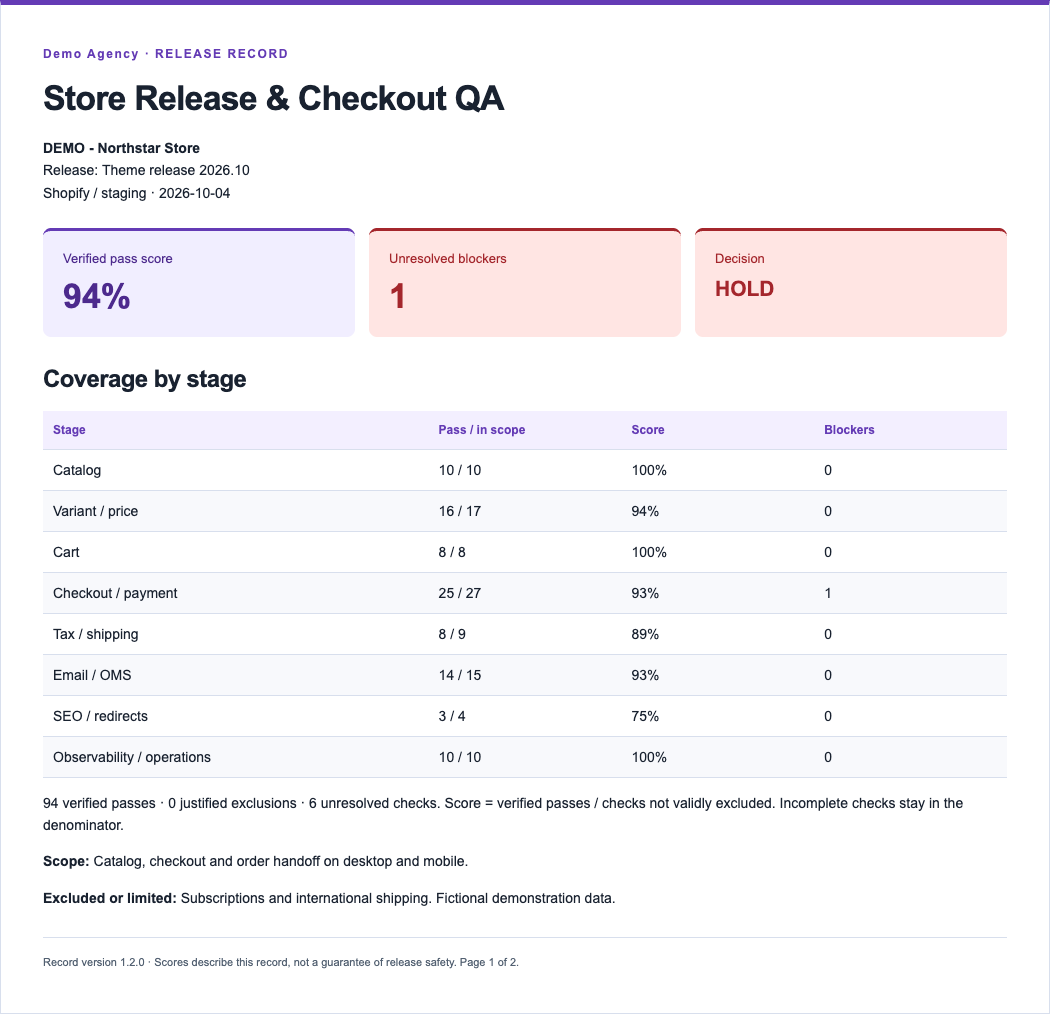
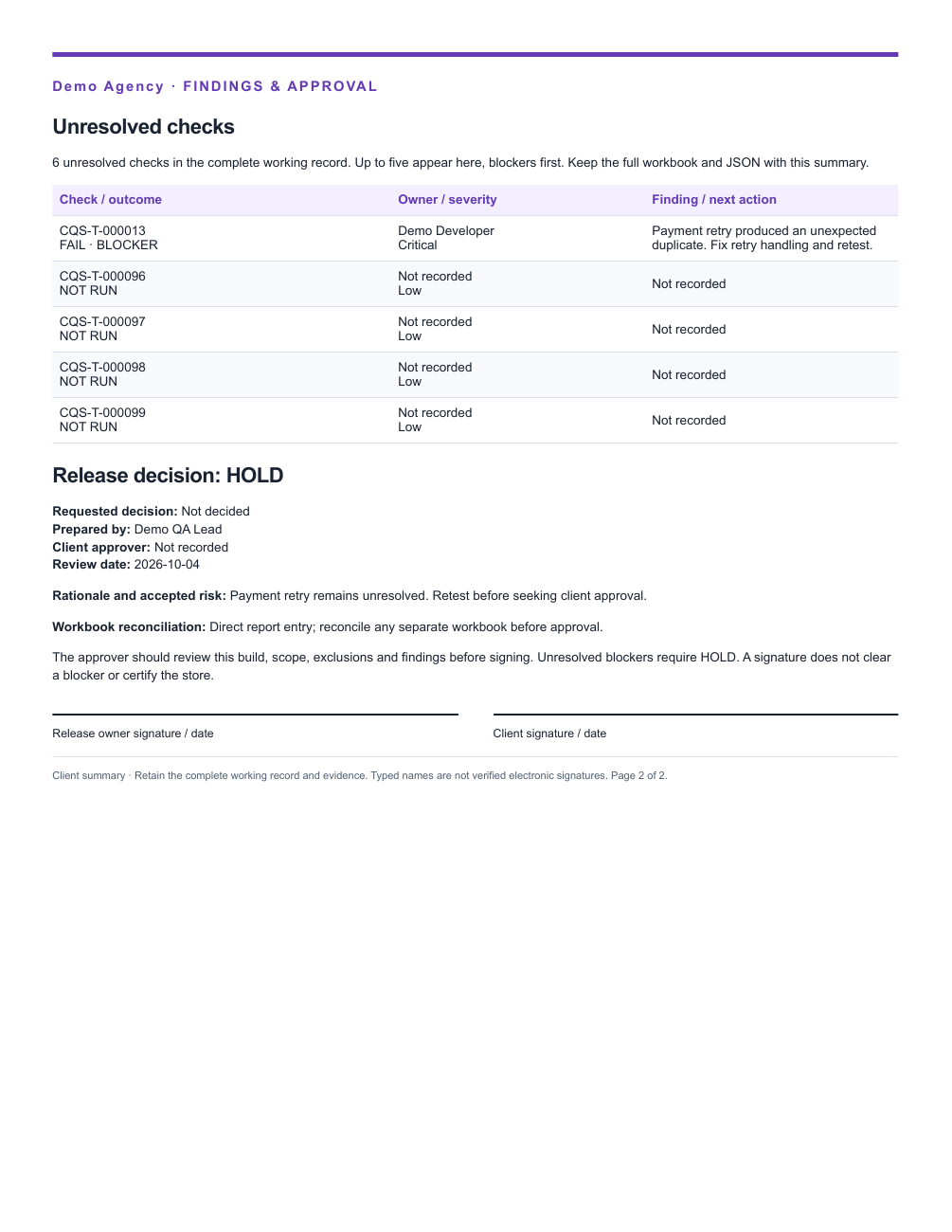
Demo Agency and Northstar Store are fictional. The report uses manually entered test records.
Preview the real 12-check sampleTHE RELEASE METHOD
You do the testing. The workbook gives you the checks and a place to record results, evidence, issues and retests. Use the offline report to prepare the release decision.
Set the store, environment, build, release scope and exclusions.
Run applicable checks. Enter the observed result, owner and evidence reference.
Record severity and responsibility in the issue log. Retest fixes and review unresolved blockers.
Reconcile the records, review stage results and document a human GO or HOLD decision. Print the summary and retain the files.
WHAT YOU RECEIVE
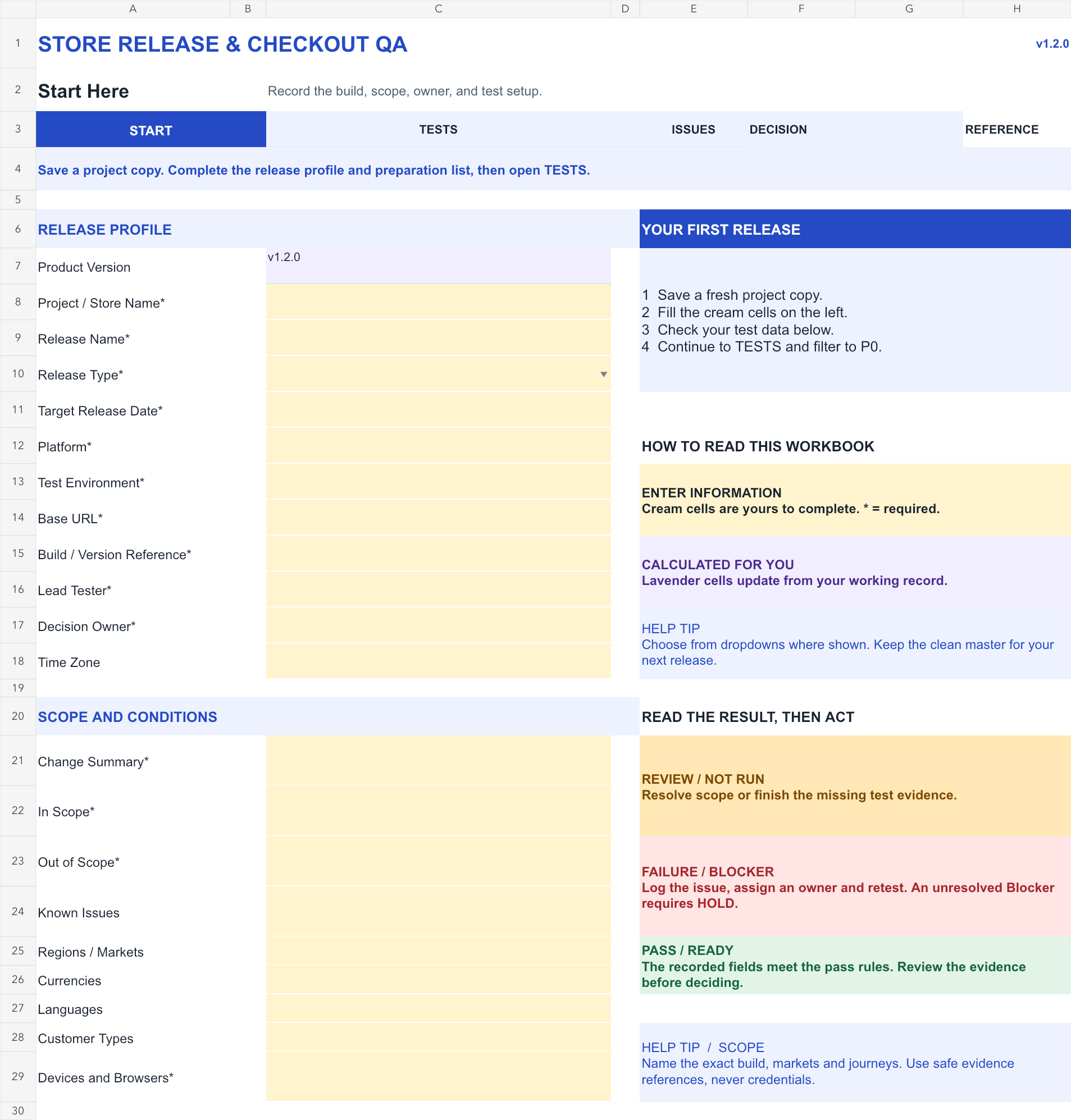
Five sheets cover setup, 100 checks, issues, the release decision and reference. Cream cells are for your entries; lavender cells calculate results. Help Tips explain the fields.
Select the image for the full workbook preview.
The report groups check results into eight stages and keeps unresolved blockers in view. Add issue details, then save the report as JSON so you can reopen it.
Select the image for the full report preview. Fictional data.
RELEASE HANDOFF
Review scope, top findings and signature lines. Agency licensees may deliver the rendered PDF or printed report to clients; retain the workbook and report record for the details behind the decision.
EIGHT STAGES
Catalog; variants and pricing; cart; checkout and payment; tax and shipping; email and order management; SEO and redirects; observability and operations.
These are platform-neutral manual journeys for Shopify and Magento / Adobe Commerce releases. Scope them to the features your store actually uses.
BEFORE YOU BUY
Many teams already keep release tasks in a spreadsheet, Jira or Asana. This product does not replace those tools. It adds a defined testing record for the release decision.
Keep it if it already defines the checks, expected results, owners, evidence, issue severity, retests and release decision your team needs. This system is for teams that want those parts connected without building and maintaining the method themselves.
You can. The difference is structure. This workbook includes 100 checks, setup fields, an issue log, calculated stage results, blockers and a decision record. Jira or Asana can still manage assignments and project dates.
If you run releases for one store, you can use the workbook and report again for each release. Merchant also includes the instructions and 12 months of released updates. Try the free sample to judge the checks before buying.
Agency lets one firm put its name and logo on client reports and prepare up to 10 distinct client release reports per calendar month. Clients can receive a rendered PDF or printed report. The working files stay with the agency.
ONE-TIME LICENSES
Both editions contain the same workbook, offline report, printable summary, guides and FAQ. Choose Agency if you need to work across client stores or put your agency name and logo on reports.
FOR ONE NAMED STORE
$149 USD once
For the store's internal team and contractors working solely on that store and its development or staging environments.
FOR ONE AGENCY ENTITY
$399 USD once
For agency staff and contractors working across client stores, within the monthly report limit.
An internal team releasing its own store uses Merchant. An agency reporting on client stores uses Agency. A developer working across unrelated stores needs rights for that work; Merchant does not cover it. If a client needs an editable workbook or offline report application, that client needs its own license.
| Use or deliverable | Merchant · $149 | Agency · $399 |
|---|---|---|
| Store scope | One named store, including development and staging | Client stores served by one agency legal entity |
| Release volume | Unlimited for that named store | Up to 10 distinct client release reports per calendar month; corrections to the same release do not count again |
| People using the files | Internal team and store-specific contractors | Agency staff and contractors acting for the agency |
| Report branding | Titan branding; no agency white-label rights | Agency name and logo permitted |
| Client handoff | Store-specific internal sharing | Rendered PDF or printed reports may be delivered to clients |
| Reusable files to clients | Not permitted for unrelated stores or redistribution | Blank workbook, HTML app, project JSON and reusable source cannot be delivered |
| Updates and support | Keep using the downloaded version; released updates for 12 months; file and usage support, with no promised update schedule or perpetual support commitment | |
More than 10 Agency client releases in a month requires a separate written license before use. Neither edition permits resale, sublicensing, public posting or redistribution of reusable files, including modified versions. A client who receives a report does not receive a product license.
One-time USD prices; applicable taxes may be added at checkout. The product requires manual testing and desktop Excel is the primary workbook environment. Digital product sales are final and non-refundable except where required by law; see the Terms of Use. The linked Merchant and Agency licenses govern permitted use.
LOOK BEFORE YOU BUY
The free PDF contains 12 checks across all eight stages, with steps, expected results and fields for the owner, evidence and outcome. It does not include the workbook or reporting workflow.
Download free sample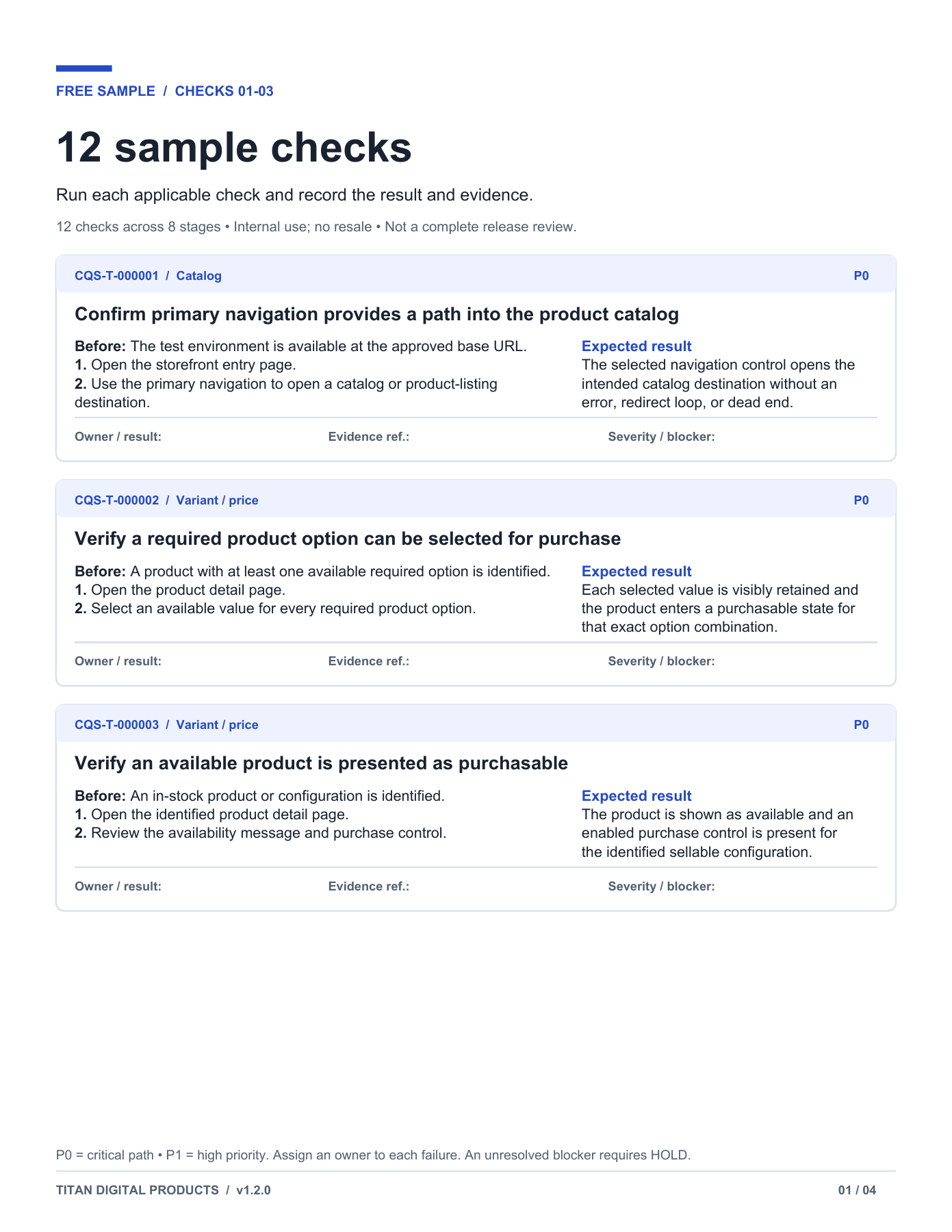
FAQ
After successful payment, Stripe returns you to a Titan confirmation page with your edition's ZIP download. Keep the original checkout browser open and download within 15 minutes. There is no delivery email. If access fails, contact support with your purchase reference.
No. Your team runs each applicable check, records observations and evidence, assigns issue owners and retests fixes. It is a manual workflow, not a Shopify or Magento extension.
Desktop Excel is the primary workbook environment. The offline report opens in a modern desktop browser. You need enough knowledge of your store and release to run the checks and judge results. Google Sheets and Apple Numbers may change formulas or formatting after conversion and are not the supported primary workflow; mobile editing is not promised.
Time depends on store complexity, release scope and findings; there is no fixed completion time. Mark non-applicable checks with a reason and document exclusions. Your release owner must judge whether the resulting scope is sufficient.
Log the finding, severity, owner and retest outcome. The report surfaces unresolved blockers; even a high recorded pass score cannot clear one. A named person reviews scope, evidence and accepted risk and records the decision.
Complete the workbook first. You can export TESTS as CSV UTF-8 and import those rows into the offline report. The import replaces report check records but does not import ISSUES severity, ownership, retests or DECISION approval; reconcile these manually. Save the report JSON explicitly for later use and print the two-page summary as PDF. The tool does not autosave or sign for you.
Keep your current checklist if it already covers your needs. This system joins 100 defined checks and expected results with evidence references, issues, retests, blocker visibility, eight-stage reporting and a human release-decision record. The free sample lets you inspect the check format; it does not include the full reporting workflow.
Merchant covers one named store and its store-specific team and contractors, with unlimited releases for that store. Agency covers one agency entity across client stores, up to 10 distinct client release reports per calendar month. Corrections to the same release do not consume another report. More than 10 requires a separate written license. See the Merchant and Agency licenses before purchase.
Agency may brand reports with its name and logo and deliver rendered PDFs or printed reports. It may not give clients the blank workbook, HTML app, JSON or reusable source. Merchant has no agency white-label rights or unrelated-store use. A client needing working files needs its own license.
Yes, the checks describe platform-neutral ecommerce journeys. Scope the library to the features, apps, extensions and integrations your store actually uses. The product does not inspect either platform automatically.
You may keep using your downloaded version. Updates released within 12 months of purchase are included through the original delivery channel, without a promised update schedule. File and usage support is available; store testing, implementation and consulting are separate services.
Yes. The screenshots show actual product output with labeled fictional demo data, and the 12-check PDF previews all eight stages. Digital product sales are final and non-refundable except where required by law. See the Terms of Use and contact support about duplicate charges, wrong editions or unusable files.
No. It is a manual QA recordkeeping tool. It does not certify readiness or guarantee a defect-free release, and it does not replace specialist compliance or security work.
WHEN A CHECK REVEALS A DEEPER ISSUE
Payment, tax or inventory failures that recur across releases can go beyond a QA checklist. Magento / Adobe Commerce teams can request a separately scoped Titan Forensic Platform Audit.
Explore the Forensic Platform AuditThe audit is a separate service. Its scope, availability and price are confirmed independently. It is not included with this digital product.