

Cron running does not mean cron is reliable
Teams often confirm that cron is configured and consider the work complete. A crontab entry exists, the process starts, and everyone moves on.
A running process can still leave jobs as missed, get stuck in running, or fail on every attempt. The storefront may show no warning until one of those failures breaks another part of the store.
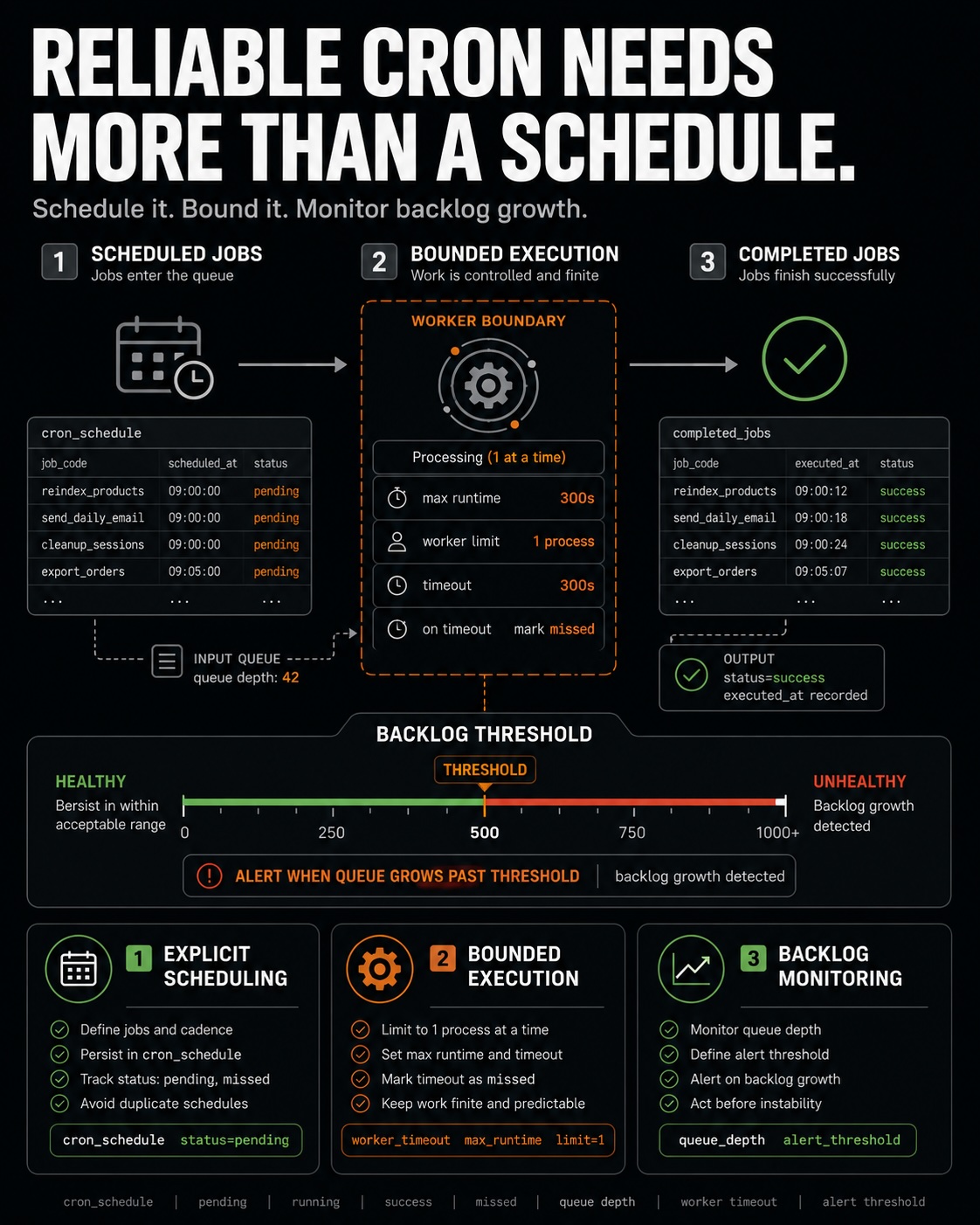
Reliable background processing requires more than a crontab entry. Cron must start on time, run as the correct user, finish its work, and provide enough status data to detect failures.
What depends on cron
Cron drives background work customers never see directly. Reindexing, sending email, cleaning expired quotes, generating catalog price rules, and processing message queues all depend on it.
When cron is unreliable, several parts of the store can degrade at the same time. The storefront may keep serving pages while indexes become stale, emails stop, and cleanup jobs fail.
Cron is the scheduler behind much of the store's background work. A problem in that scheduler can affect features that seem unrelated to cron.
The crontab entry that starts Magento work
Magento's background work normally starts from one system crontab line. That line runs bin/magento cron:run every minute and gives Magento a chance to dispatch scheduled jobs across their groups.
The command bin/magento cron:install can install the crontab entry Magento expects. Verify that the entry exists, runs the correct command, and uses the correct system user. A missing entry or wrong user can stop every job downstream.
The every-minute cadence is a scheduling requirement. It does not run every job every minute. It lets Magento check which jobs are due and start them. A slower cadence gives the scheduler fewer chances and can leave jobs as missed.
Read reliability from the schedule table
The cron_schedule table records what happened to scheduled jobs. Grouping rows by status shows whether jobs are succeeding, missing their schedule, getting stuck, or failing.
success rows and a small queue of pending jobs. Piles of missed jobs, rows stuck in running, or repeated error rows each point to a different cron failure.Each status gives you a specific clue. missed means cron is not keeping up. A row stuck in running usually means a job was killed. Repeated error rows point to one failing job by its job_code.
Cron must run as the correct user
A common failure occurs when cron runs as the wrong system user. If that user differs from the web server user, cron may create files the web server cannot read or fail to write to required locations.
The result can look random. A job runs, but its output cannot be used. Another job fails with a permission error because it is running under the wrong user context.
Check the user that owns the crontab and the user that runs the web process. Matching the expected user context is a basic reliability check and often explains permission errors in the logs.
Jobs must finish without overlap
Jobs can overlap when one run has not finished before the next cron run starts. The two processes may compete for the same data, files, or locks.
A job can also hang while waiting for a slow external service or a lock. It holds its process slot and may leave a row stuck in running. The scheduler cannot finish work that never completes.
Reliable cron depends on predictable job completion. Fix hanging or overlapping jobs at the job level by adding timeouts, reducing the work, or preventing a second run while the first is active.
Consumers must keep the message queue moving
Message queue consumers handle asynchronous work outside the original web request. A stuck or stopped consumer leaves that work in the queue instead of completing it.
A growing queue backlog means consumers are not keeping up or have stopped. This is the queue's equivalent of a growing missed count in cron.
Reliable background processing includes scheduled jobs and queue consumers. Watch queue depth beside cron status so you can see whether background work is actually finishing.
Monitoring keeps cron reliable
A cron setup can work today and fail next month. Without monitoring, the change stays hidden until a downstream feature breaks.
A simple monitor can count missed and error rows in the schedule table. Alert when either count rises. That can find a cron problem within hours instead of waiting for the next stale-index complaint.
Monitoring turns cron from a one-time setup task into a process you can check continuously. It shows the difference between a configured scheduler and dependable background processing.
Verify cron, then monitor it
Reliable cron comes from verification and monitoring, not a larger crontab. Confirm the entry, user, and every-minute cadence. Then watch the schedule table and queue for failure states.
Dependable background work has successful jobs, a controlled pending queue, no unexplained missed or error growth, and consumers that keep processing messages. Verify those conditions during every stability review.